










📁
Deals
📁
News
📁
Tools
📁
Tutorials
arrow
Dr.Fone iOS System Repair
arrow
iMobie AnyFix
arrow
iMyFone Fixppo
arrow
iMyFone iMyTrans
arrow
Tenorshare 4uKey
arrow
Tenorshare ReiBoot
Recent Posts
  • iOS 27 Release Date, Features, and Supported iPhones: Everything You Need to Know Mar 24, 2026
  • Apple's WWDC 2026 & iOS 27: Everything You Need to Know — Siri Chatbot, macOS 27, M5 Macs, and the End of Intel Mar 24, 2026
  • Did Apple buy Halide? Inside Apple’s Secret Bid for Halide: A Co-Founder Lawsuit, and What It Means for the iPhone 18 Pro Mar 22, 2026
  • What’s Next from Apple? Here all we know about the upcoming Apple Products for 2026 Mar 22, 2026
  • 15-inch M4 MacBook Air deal: Amazon Slashes M4 15-Inch MacBook Air to Just $949 Ahead of Big Spring Sale Mar 22, 2026
  • Apple releases iOS 26.4 and iPadOS 26.4 Release Candidate (RC) Mar 18, 2026
View all posts →

Pinned

  • iApps
  • Tools
  • Tweaks
    • News
    • Tutorials
  • iSpecs
    • iOS
    • iOSBeta
  • iRingtones

Recent

  • iOS 27 Release Date, Features, and Supported iPhones: Everything You Need to Know
  • Apple's WWDC 2026 & iOS 27: Everything You Need to Know — Siri Chatbot, macOS 27, M5 Macs, and the End of Intel
  • Did Apple buy Halide? Inside Apple’s Secret Bid for Halide: A Co-Founder Lawsuit, and What It Means for the iPhone 18 Pro
  • What’s Next from Apple? Here all we know about the upcoming Apple Products for 2026
  • 15-inch M4 MacBook Air deal: Amazon Slashes M4 15-Inch MacBook Air to Just $949 Ahead of Big Spring Sale
  • Apple releases iOS 26.4 and iPadOS 26.4 Release Candidate (RC)

Recent Apps

  • Tenorshare 4uKey
  • iMyFone iMyTrans
  • iMobie AnyFix
  • Dr.Fone iOS System Repair
  • iMyFone Fixppo
IPSWDL Blog

Notifications

iPhone Mirroring feature now available with iOS 18 and macOS Sequoia
NewsiPhone Mirroring feature now available with iOS 18 and macOS Sequoia
ipswdl February 17, 2026 News
  • Desktop
  • All Posts
  • Software
  • Deals 1
  • News 21
  • Tools 24
  • Tutorials 21
  • WWDC
  • Apple
  • iOS 27
  • Tenorshare 4uKey
  • iMyFone iMyTrans
  • iMobie AnyFix
  • Dr.Fone iOS System Repair
  • iMyFone Fixppo

Apple’s latest betas, iOS 18 and macOS Sequoia, introduce a groundbreaking feature called “iPhone Mirroring,” transforming how users interact with their devices. Unveiled on 26 of June 2024, this innovation allows seamless mirroring of an iPhone’s display onto a Mac, opening up new possibilities for productivity, convenience, and cross-device synergy.

How iPhone Mirroring Works

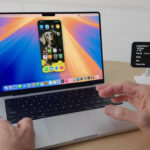
iPhone Mirroring leverages the power of Bluetooth and Wi-Fi to create a wireless connection between an iPhone running iOS 18 beta 2 or later and a Mac running macOS Sequoia beta 2 or later. Users can access the feature through a dedicated “iPhone Mirroring” icon in the Mac’s Dock.

Once connected, the iPhone’s screen is displayed in a window on the Mac, and users can interact with their iPhone apps, content, and notifications directly from their Mac’s keyboard and trackpad. This eliminates the need to constantly switch between devices, streamlining workflows and enhancing the overall user experience.

Apple Releases iOS 18 Beta 2 with New Features and Enhancements
Table of Contents
  • Key Features and Benefits
  • Requirements and Compatibility
  • Future Enhancements
  • Implications and Potential
  • Conclusion
  • Additional Information:

Key Features and Benefits

  • Seamless App Access: iPhone Mirroring grants instant access to all iPhone apps on the Mac, allowing users to effortlessly respond to messages, browse social media, or check emails without picking up their phone.
  • Notification Management: Users can view and act on iPhone notifications directly from their Mac, ensuring they stay informed and responsive without interrupting their workflow.
  • Enhanced Productivity: iPhone Mirroring empowers users to leverage the larger screen of their Mac for tasks like editing photos, watching videos, or playing games, all while maintaining access to their iPhone’s functionalities.
  • Wireless Convenience: The wireless nature of iPhone Mirroring eliminates the need for cables and adapters, providing a clutter-free and convenient experience.

Requirements and Compatibility

iPhone Mirroring is compatible with both Apple silicon and Intel-based Macs with a T2 Security Chip. Both devices must be signed in with the same Apple ID using two-factor authentication and be in close proximity with Bluetooth and Wi-Fi enabled.

Future Enhancements

While already impressive, iPhone Mirroring is set to become even more powerful with future updates. Apple has announced plans to add drag-and-drop functionality for files, photos, and videos between iPhone and Mac later in 2024.

Implications and Potential

iPhone Mirroring represents a significant step forward in Apple’s ecosystem integration efforts. By breaking down barriers between iPhone and Mac, it empowers users with unprecedented flexibility and control over their digital experience.

This innovation has the potential to redefine how we work, communicate, and consume content across devices, further solidifying Apple’s position as a leader in cross-device integration and user-centric design.

Conclusion

iPhone Mirroring is a game-changer, revolutionizing how we interact with our devices and paving the way for a more seamless and integrated future. As Apple continues to refine and expand this feature, it will undoubtedly become an indispensable tool for users seeking to maximize their productivity and enjoyment across the Apple ecosystem.

Additional Information:

  • For more detailed information and hands-on demonstrations, you can visit 9to5Mac’s website and YouTube channel, which offer comprehensive coverage of iPhone Mirroring:
    • 9to5Mac article: https://9to5mac.com/2024/06/25/hands-on-iphone-mirroring-with-ios-18-and-macos-sequoia-video/
    • YouTube video: https://www.youtube.com/watch?v=Cjt0dyQN0S8
  • Other informative resources:
    • AppleInsider article: https://appleinsider.com/inside/macos-sequoia/tips/how-to-get-started-with-iphone-mirroring-in-ios-18-and-macos-sequoia
    • MacRumors article: https://www.macrumors.com/2024/06/24/macos-sequoia-beta-2-iphone-mirroring/

Post navigation

PreviousApple Releases iOS 18 Beta 2 with New Features and Enhancements
NextNew Firmware Updates for AirPods and Beats: What You Need to Know

0 Comments

Be the first to comment.

Replying to

Related Posts

  • iOS 27 Release Date, Features, and Supported iPhones: Everything You Need to Know March 24, 2026
  • Apple's WWDC 2026 & iOS 27: Everything You Need to Know — Siri Chatbot, macOS 27, M5 Macs, and the End of Intel March 24, 2026
  • Did Apple buy Halide? Inside Apple’s Secret Bid for Halide: A Co-Founder Lawsuit, and What It Means for the iPhone 18 Pro March 22, 2026
  • What’s Next from Apple? Here all we know about the upcoming Apple Products for 2026 March 22, 2026

Recent Posts

  • iOS 27 Release Date, Features, and Supported iPhones: Everything You Need to Know March 24, 2026
  • Apple's WWDC 2026 & iOS 27: Everything You Need to Know — Siri Chatbot, macOS 27, M5 Macs, and the End of Intel March 24, 2026
  • Did Apple buy Halide? Inside Apple’s Secret Bid for Halide: A Co-Founder Lawsuit, and What It Means for the iPhone 18 Pro March 22, 2026
  • What’s Next from Apple? Here all we know about the upcoming Apple Products for 2026 March 22, 2026
  • 15-inch M4 MacBook Air deal: Amazon Slashes M4 15-Inch MacBook Air to Just $949 Ahead of Big Spring Sale March 22, 2026